Deducting TDS on payments made to Vacation Labs
Info
You will be unable to deduct TDS while making a payment towards your Vacation Labs subscription invoice (due to a technical limitation in our subscription billing software). If you attempt to make a payment after deducting TDS, the billing system will continue showing the invoice as “due” due to the balance amount and it will ultimately lead to your account getting suspended. Therefore, we have come up with the following process, which seems to have now become industry practice. This is the same process that we are following for our payments to Amazon AWS, or PayPal.
The process to claim TDS refund involves the following steps:
1. Make full payment for your Vacation Labs invoice, without deducting any TDS amount.
2. Calculate the TDS amount (2% under section 194C or 10% under 194J, as applicable), and deposit it with the income tax authorities (usually once a month). Finally, file your TDS returns accordingly (usually once a quarter). While filing the TDS returns, please be careful to use the PAN Number of Vacation Labs (AAHCM9291P).
3. Download the TDS certificate (FORM NO. 16A) from the Income Tax website
4. Send an email to support@vacationlabs.com requesting for TDS refund. Please attach the following documents in your email:
-
All relevant TDS certificates (i.e. Form 16 A)
-
Account number where the TDS refund needs to be deposited
-
Table with the following details
<table>``<colgroup>``<col width="131">``<col width="134">``<col width="116">``<col width="119">``</colgroup>``<tbody>``<tr>``<td>``<p dir="ltr">``<span class="highlight">``<b>``<span class="size">Invoice No</span>``</b>``</span>``</p>``</td>``<td>``<p dir="ltr">``<span class="highlight">``<b>``<span class="size">Invoice Sub-total </span>``</b>``</span>``</p>``</td>``<td>``<p dir="ltr">``<span class="highlight">``<b>``<span class="size">TDS rate</span>``</b>``</span>``</p>``</td>``<td>``<p dir="ltr">``<span class="highlight">``<b>``<span class="size">TDS Amount</span>``</b>``</span>``</p>``</td>``</tr>``<tr>``<td>``<p dir="ltr">``<span class="highlight">``<span class="size">SUB-0001</span>``</span>``</p>``</td>``<td>``<p dir="ltr">``<span class="highlight">``<span class="size">Rs 5,000</span>``</span>``</p>``</td>``<td>``<p dir="ltr">``<span class="highlight">``<span class="size">2%</span>``</span>``</p>``</td>``<td>``<p dir="ltr">``<span class="highlight">``<span class="size">Rs 100</span>``</span>``</p>``</td>``</tr>``</tbody>``</table>
Note
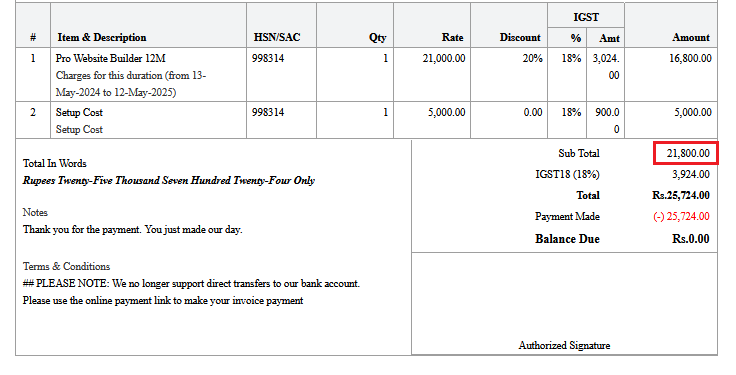
Please note, TDS has to be deducted on the base value of the invoice, i.e. amount excluding taxes (this shows up as a Sub-total on most invoices). For example, TDS under section 194C, for the below invoice will be 2% x 21,800 = Rs 436
- After receiving all the necessary details, it will take 10 working days to process the refund.