How to generate CSR and Unique Key for an SSL certificate
Please follow these steps to generate CSR and Unique Key for a SSL certificate:
Step 1: Open the CSR Generator
Go to the website https://csrgenerator.com/ in your browser. This tool will help you create the CSR (Certificate Signing Request) and the private key.
Step 2: Fill in the Required Details
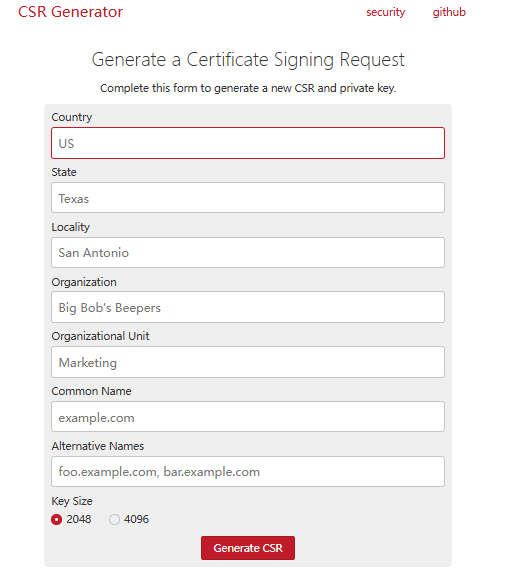
You will need to enter the following information:
-
Country: Enter the first two letters of your country’s ISO code. For example, India’s ISO code is “IND”, so you will type “IN”.
-
State: Write the full name of your state.
-
Locality: Enter the name of your city or locality.
-
Organization: Enter the legal name of your company or organization.
-
Organizational Unit: Mention the department name, such as Marketing, Operations, HR, etc.
-
Common Name: Enter your domain name with “www”. Example: www.vacationlabs.com.
-
Key Size: Select “2048” for the key size.
Step 3: Generate the CSR
After entering all the details, click the Generate CSR button. The tool will create your CSR and private key instantly.
Step 4: Save the Files
Once the CSR and private key are generated:
-
Copy the entire CSR and entire private key.
-
Save them in a text file using Notepad or WordPad.
-
Keep these files safe, as you will need them to install your SSL certificate.