Meta Keywords
Overview
Meta keywords are meta tags that you can use to give search engines more information about a page’s content.
Warning
We have purposely not added any way to manage meta keywords on the platform because they are an outdated concept and have no impact on your search engine rankings. Please check this Google blog, which says meta keywords don’t have any impact on SERPs.: https://developers.google.com/search/blog/2009/09/google-does-not-use-keywords-meta-tag
However, if you still wish to add meta keywords manually, follow the steps below.
Caveat: This is strongly not recommended. If this causes any unintended consequences, support on this topic will be limited.
Add Meta Keywords to specific pages
To add meta keywords manually to specific pages, please follow the steps below.
-
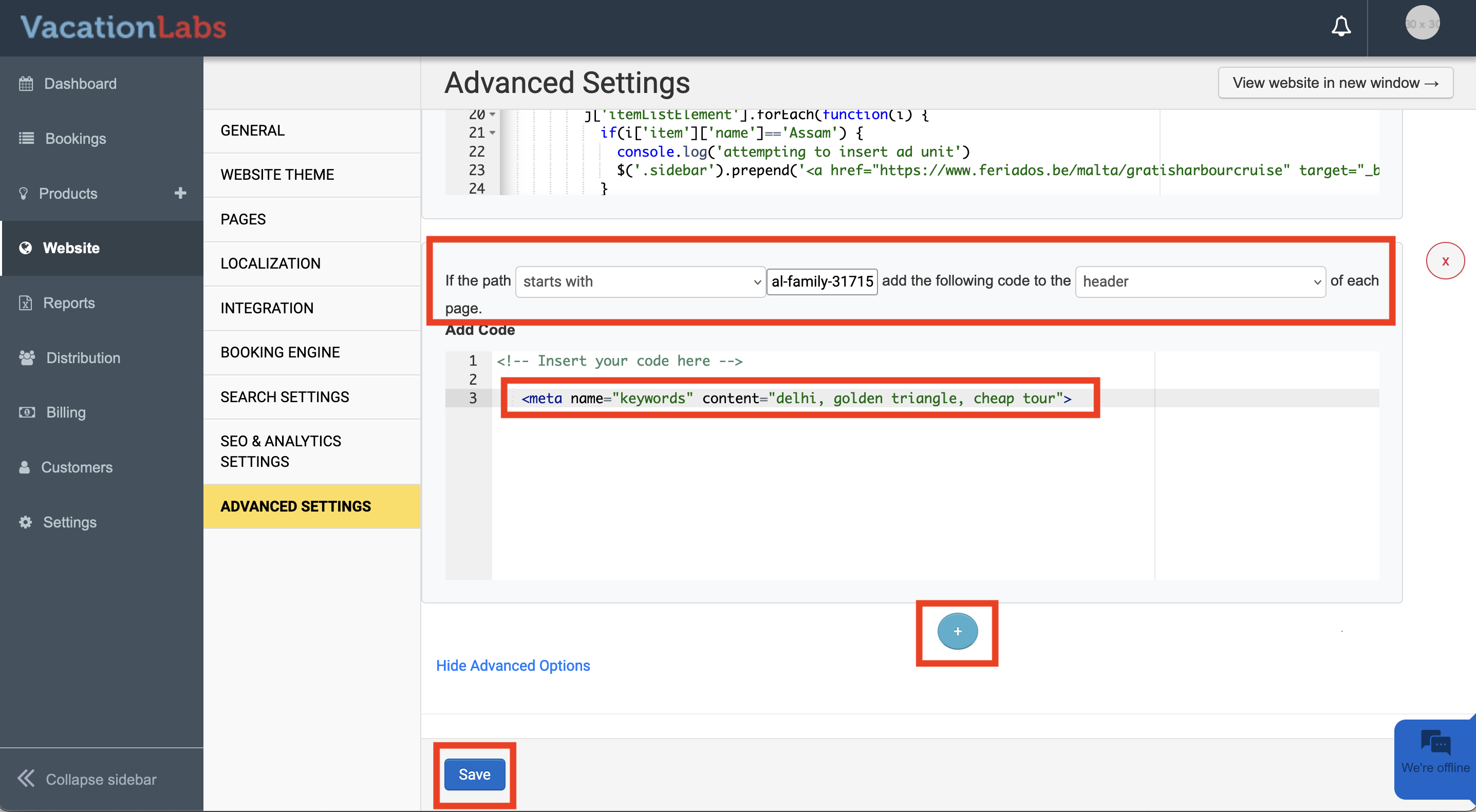
Navigate to Backoffice > Website > Advanced Settings.
-
Scroll down to the “Set rules” section.
-
Add a rule with the following settings:
-
If the path starts with
-
In the text box next to it, add the path of the page where you want to add meta keyword tags (not the entire URL, just the path).
-
Add the code to the header of each page.
-
In the large text box below, add the entire meta HTML tag.
-
Use the blue plus icon to target more pages.
-
Finally, don’t forget to press the save button.