Every page can now generate leads
Add inquiry forms to any website page
With this update, you can now place a full-featured inquiry form on any page of your website — not just tour pages. Whether it’s your About Us page, a Destinations overview, or a custom landing page, customers can now reach out the moment they have a question. The inquiry form you see below is a fully-featured, long-form inquiry experience, designed for customers who are exploring ideas and need a conversation — not just a quick question. It allows you to collect structured, high-intent inquiries on pages like About Us, Destinations, or custom landing pages, giving your team enough context to respond meaningfully from the very first reply. This is the same inquiry system you already trust on tour pages, now made available across your entire website — consistent in behaviour, responsive on all devices, and flexible enough to support everything from simple questions to detailed, custom trip requests.
This is the fourth and latest part of our ongoing upgrade to the Inquiries Dashboard. You can read the Third part here. More improvements to inquiry handling and reporting are on the way — stay tuned.
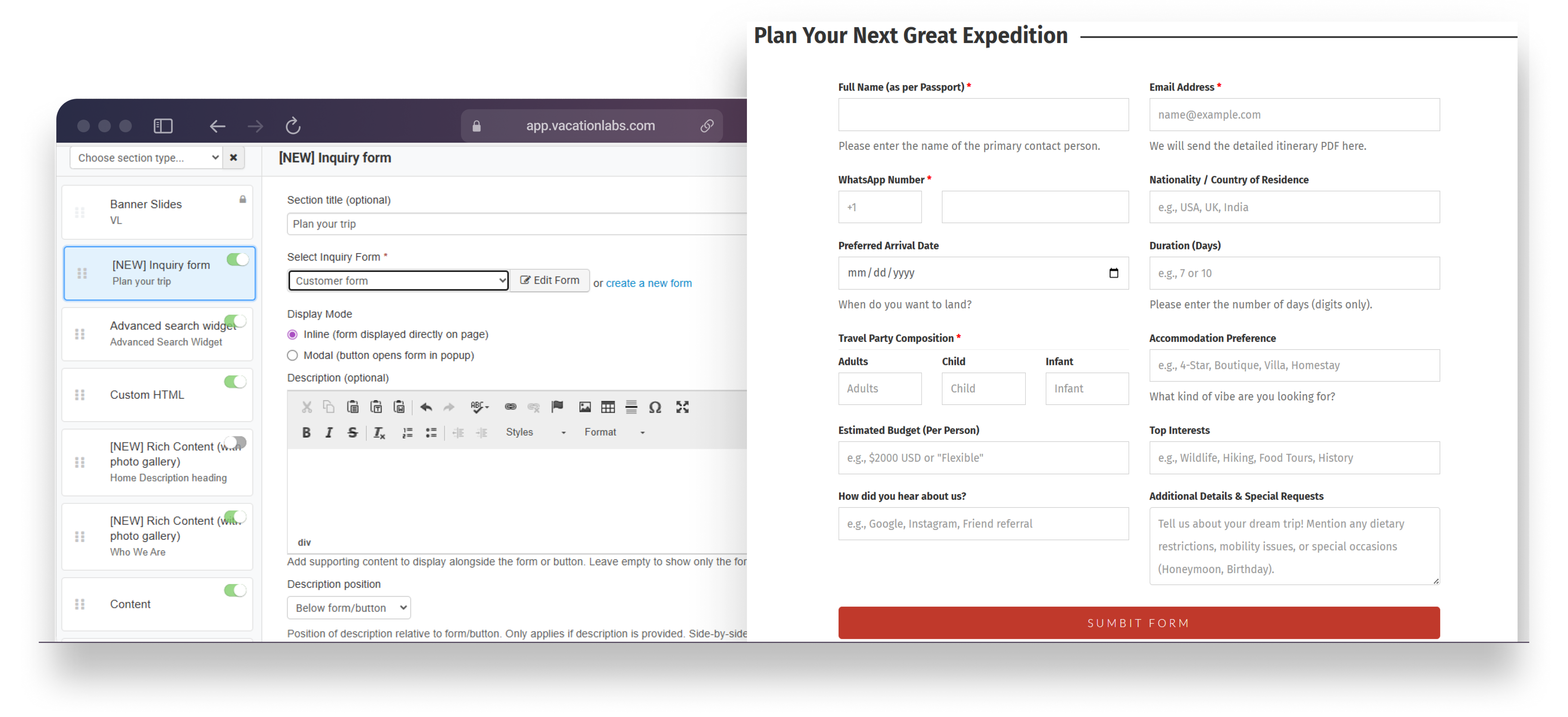 Each inquiry submission is automatically tagged with the page URL it came from, so your backoffice inquiry list clearly shows which page generated the inquiry. The form editor itself remains the same familiar builder you already use, with sensible default placeholders for common fields like name, email, and phone number.
Capture leads beyond tour pages: Add inquiry forms to About, Destinations, or any custom page
Flexible display options: Use inline forms or popup modals based on your page design
Clear source tracking: See exactly which page each inquiry came from in the backoffice
How to add an inquiry form to a static page
Go to Vacation Labs Backoffice → Website → Pages
Open any static page (About, Contact, Destinations, etc.)
Add the Inquiry Form section
Choose inline or popup display, customise the form, and hit Save
Availability: This feature is available on all plans.