Cleaner, SEO-friendly URLs for collection & promotion pages
This one is for everyone doing serious SEO work on their website — it was easily the most-requested URL change we heard from operators optimizing their search rankings. Your collection pages and coupon/promotion pages can now live at any web address you like, so a “Winter Deals” collection can sit at /winter-deals and a promotion page at /europe-sale.
Every other page type on your website already let you set a custom URL. Collection and promotion pages were the odd ones out — they were stuck behind a fixed /collections/… and /coupon/… prefix, so the cleanest you could manage was /collections/winter-deals. That restriction is now gone, and these pages work like the rest of your site.
Better for search rankings: short, keyword-rich paths like /winter-deals read better to both visitors and search engines than a generic /collections/ prefix.
Easier to share and remember: a clean URL is far easier to say out loud, print on a flyer, or paste into a WhatsApp broadcast.
No broken links or lost rankings: when you change a page’s URL, the old address automatically redirects to the new one with a permanent 301 redirect — the same redirect handling you get from the SEO Center — so existing links and your accumulated search rankings carry over.
Part of a bigger SEO push. This continues the work we started with the
SEO Center — one place to manage meta titles, schema markup, robots.txt, and 301 redirects across your whole website.
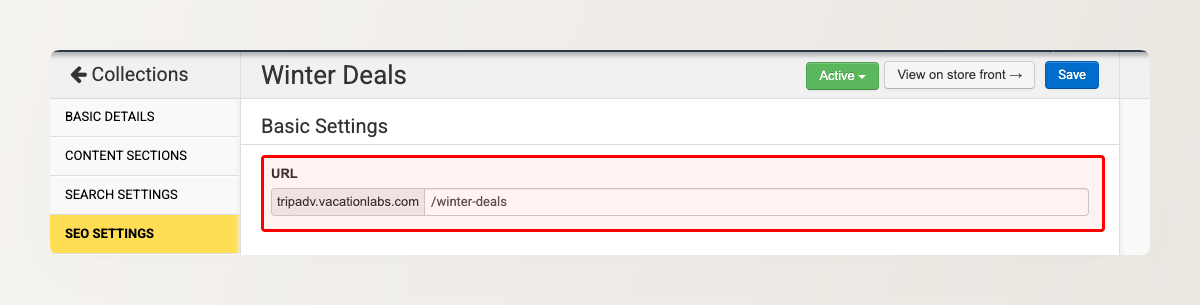
You set the URL from the same SEO Settings panel you already use for a page’s meta title and description — in the collection editor for collections, and on the Promote on Website tab of the coupon editor for promotions.
How to set a custom URL
For a collection page: go to Products > Collections, edit the collection, open the SEO Settings tab, type the path you want in the URL field, and click Save.
For a promotion page: go to Products > Promotions, edit the coupon, open the Promote on Website tab, and set the path in the URL field under SEO Settings.