Adding Support Contact Numbers to the website
Basic Settings
Updated
You can update the support phone number(s) displayed on your website directly from your Vacation Labs account.
Steps to Update or Add Phone Numbers
-
Log in to your Vacation Labs account.
-
Use your registered email and password to sign in.
-
Navigate to Website Settings.
- From the main dashboard, go to Website → General.
-
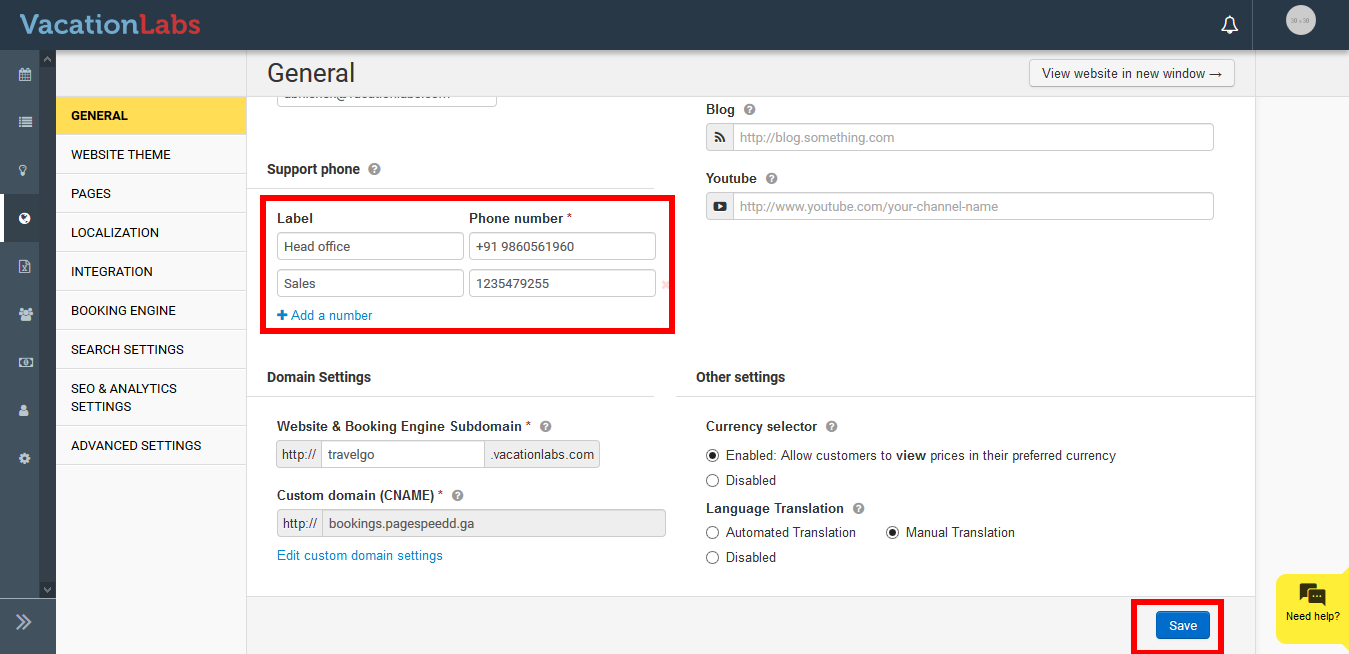
Find the “Support Phone” section.
- Scroll down the page until you see the Support Phone field.
-
Edit or Add Phone Numbers.
-
To update an existing number, simply change the Phone Number and Label fields (e.g., “Sales,” “Support,” “WhatsApp”).
-
To add more than one number, click Add a Number and fill in the new fields for Phone Number and Label.
-
-
Save Your Changes.
-
Scroll to the bottom of the page and click Save.
-
The updated numbers will now appear on your live website.
-
Tip
Tip: You can add multiple numbers if you have different departments (for example: Sales, Customer Support, and Emergency).