Enable/Disable SMS notifications for your customers
Our bookings management system allows you to send SMS notifications to your custom ers when they book a tour. There are 3 types of SMS notifications available at the moment:
- Booking Confirmation SMS
- Pre-trip Reminder SMS
- Payment link SMS
If you are subscribed to the any of the Booking engine plans, these are by-default already ENABLED on your account, but you can always choose to disable them or enable them back again. To control the SMS notifications follow the steps below:
-
Login to your Vacation Labs account
-
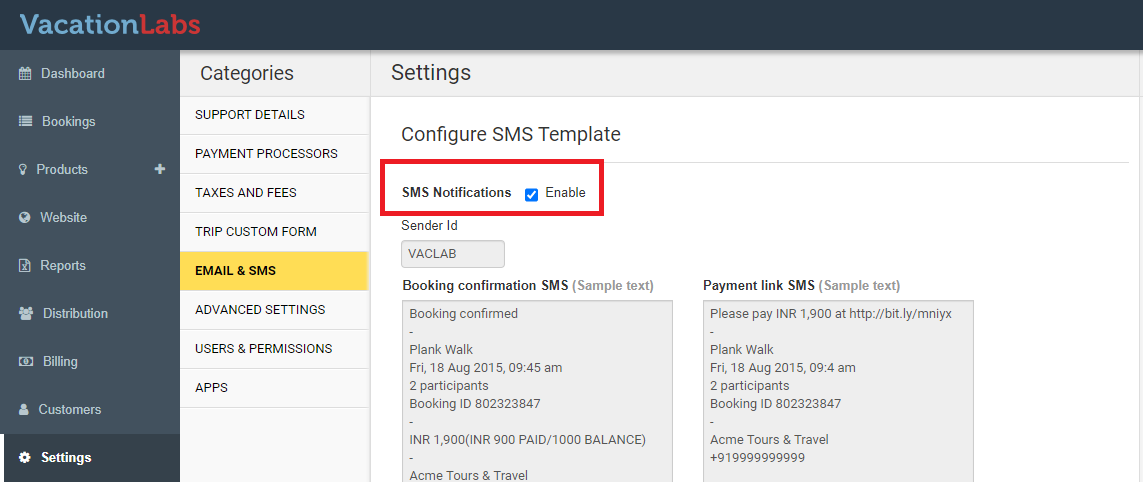
Go to SETTINGS > EMAIL & SMS
-
Under CONFIGURE SMS TEMPLATE, you will find a checkbox to ENABLE SMS Notifications.
-
It should be already checked, which means for every purchase the customer is receiving the SMSs
-
To disable them uncheck the box and click on SAVE
-
You can always come back and enable them whenever you want